


PNC Mobile
4.5120.65K Reviews
App Specs
- Version
- 5.4.2
- Updated On
- License
- Free
- Downloads
- 10,000,000+
- Developer
- PNC Bank, N.A.
- Categories
- Finance
- Platform
- Android, iOS
Screenshots
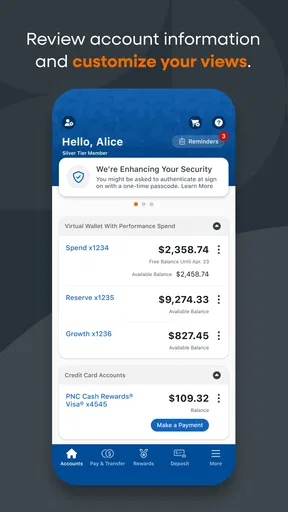
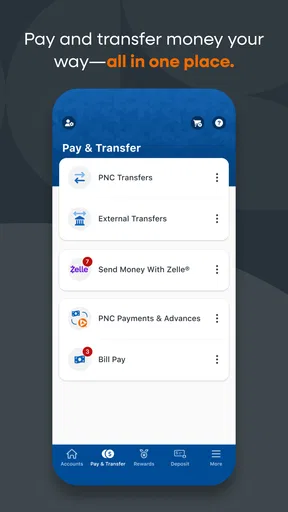
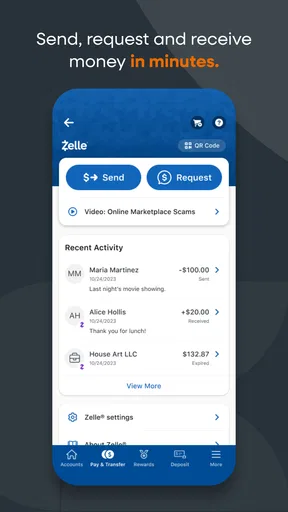
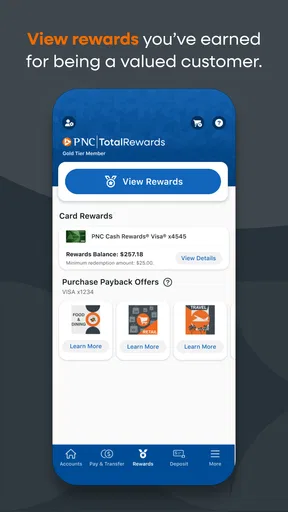
 Analysis by AppCompare
Hey there! So, I recently got my hands on the PNC Mobile app, and let me tell you, it’s been quite an experience. Whether you're a long-time PNC customer or just checking it out for the first time, this app has a lot to offer. Let’s dive in and see what makes it tick.
Getting Started with PNC Mobile
First things first, downloading the PNC Mobile app is a breeze. It's available on both Android and iOS, so no matter what device you’re rocking, you're covered. Once you’ve installed it, the setup is super straightforward. You just need to log in with your PNC credentials, and boom, you're in!
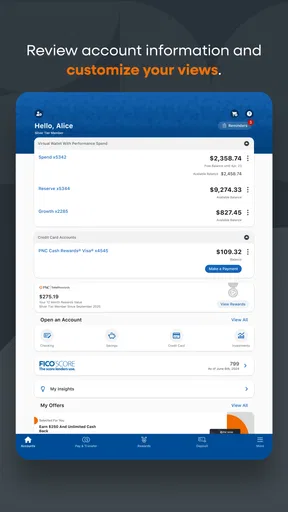
The user interface is clean and intuitive. I love how the home screen neatly displays all your accounts with a quick snapshot of your balances. It's like having a mini bank right in your pocket. Navigating through the app feels natural, and everything is just a tap away.
Features Worth Checking Out
One of the standout features is the mobile check deposit. Honestly, who has time to visit a branch these days? Simply snap a picture of the check, and you’re good to go. The app guides you through the process, making it nearly impossible to mess up.
Another nifty feature is Zelle. If you’re like me and constantly splitting bills with friends, Zelle integration is a lifesaver. Instant transfers make it easy to send and receive money without any hassle.
Need to find an ATM or branch? The app’s built-in locator has got you covered. It’s really handy when you're in an unfamiliar area and need cash ASAP.
Security and Peace of Mind
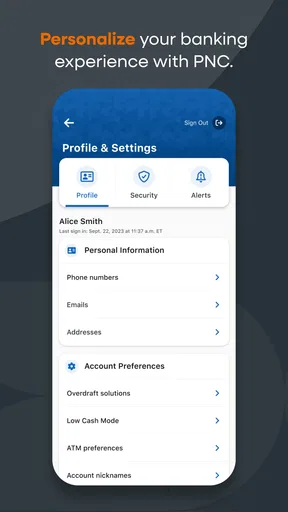
Security is always a concern when it comes to mobile banking, but PNC doesn’t skimp here. The app supports fingerprint and facial recognition logins, adding an extra layer of security. Plus, you can easily set up alerts for any unusual activity on your accounts. It's like having your own personal security guard.
Worth Reading Before You Choose

EA SPORTS FC Mobile 26 Is a Bigger Football Game, but It Takes Time

Flipboard Shows What News Apps Must Do Beyond the Feed

Switching to Android Auto Means Rethinking Your Driving Routine

Google Calendar Makes a Crowded Week Easier to Manage

Ludo King Makes the Most of the Minutes Between Plans

Baby Panda World Brings Quick Play to Modern Phones, but Its Game Library Feels Busy
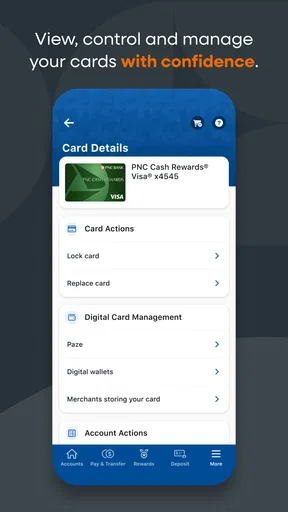
And if you ever misplace your card, the app allows you to lock it instantly. This feature has come in clutch more times than I’d like to admit.
Managing Your Finances
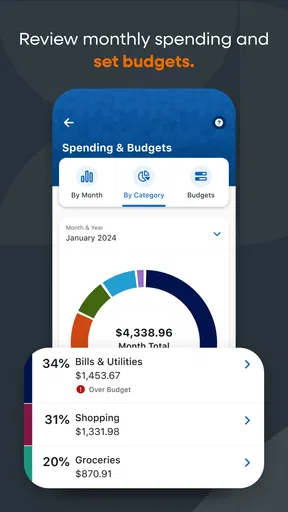
The budgeting tools are another highlight. You can track your spending habits and set budgets for different categories. It’s surprisingly satisfying to see exactly where your money is going each month. These insights have actually helped me cut back on unnecessary expenses.
For investment enthusiasts, the app provides a comprehensive look at your investment accounts. It’s not as detailed as some standalone investment apps, but it does the job for quick checks.
Customer Support and User Experience
If you ever run into issues, PNC's customer support is just a tap away. The in-app messaging feature connects you to a representative, and I’ve found them to be pretty responsive. It's nice not having to call and wait on hold forever.
Overall, the user experience with the app is smooth and dependable. It’s designed to be user-friendly, even for those who might not be tech-savvy.
One Phone, Separate Banking Lives
The app makes the most sense when each person uses their own PNC credentials, even if a household shares a tablet or keeps one phone in a common place. I would avoid treating a shared device as a shared account: signing in does not turn separate family finances into one combined view. Each person should know whose banking session is active before checking a balance or starting a transaction.
That distinction matters in a practical moment. Imagine one person wants to confirm whether a household payment has cleared while another is about to deposit a check. A quick glance at the account name and balance before tapping onward helps prevent confusion, especially when several accounts appear together. I’d also make a habit of signing out or otherwise securing the device after use, rather than leaving an open banking session where the next person might pick it up.
Set Boundaries Before You Hand Over the Device
For a shared household device, I’d settle the access rules before anyone installs or opens a banking app. Decide who may use it, whether it stays locked when unattended, and who is responsible for ending a session. Biometric sign-in can be convenient for an individual, but it should not be treated as a substitute for clear household boundaries. A fingerprint or face unlock is only useful if the device itself is controlled in a way that matches the account holder’s expectations.
I would not give a child or guest access to an adult’s logged-in banking session simply because they need to use the phone for something else. If the device has to be passed around, close the banking session first and avoid saving credentials where another user can reach them. These are ordinary device habits, not special family controls, and they help keep an accidental tap from becoming a financial action.
Coordinate Payments Without Losing Track
For couples or housemates, a useful routine is to agree on which person handles each recurring expense and use the app to check the relevant balance before making a payment. That can reduce duplicate payments and last-minute uncertainty, but it still depends on everyone communicating. The app is a convenient place to review an account; it cannot decide who owes what or keep a household agreement in sync by itself.
Zelle can be handy when people are settling shared costs, but I’d treat a transfer as a real payment rather than an informal note. Confirm the recipient and amount before sending, and make sure both people agree on what the transfer covers. For regular bills, a shared note or household budget outside the bank app may be a better record of the plan, while PNC Mobile handles the banking task. That split keeps financial coordination clear without assuming the app offers a shared household ledger.
A small but useful habit is to check the transaction and balance after an important transfer instead of relying only on memory. If a payment is time-sensitive, I would not assume that opening the app or initiating a transfer automatically settles every detail of the recipient’s timing. For anything that must happen by a deadline, leave room to verify the outcome and use the appropriate payment method for that obligation.
Who Will Get the Most From It?
PNC Mobile is a natural fit for people who already bank with PNC and want everyday account access without making a branch visit for routine checks. It is especially useful if you often need to check balances, deposit eligible checks from home, locate a nearby ATM while traveling, or keep an eye on spending. PNC Bank, N.A. develops the app, and its purpose is closely tied to managing PNC accounts rather than serving as a general-purpose financial hub.
If you bank elsewhere, the app is not a replacement for your current bank’s mobile service. The practical value comes from access to PNC accounts, so someone with no PNC relationship should not expect it to manage outside accounts just because it is a finance app. If your main need is a broad view across several banks, a dedicated multi-bank budgeting tool may suit you better. If you mainly want detailed investment research, a standalone investment service is also likely to offer more depth than a bank app designed for quick account checks.
That trade-off is normal: a bank’s own app can make account-specific tasks more direct, while separate finance tools may be better at pulling together information from different providers. I would use PNC Mobile for PNC banking and keep another tool only if I genuinely need its wider view. Running several apps for the same basic balance check can add effort instead of clarity.
Everyday Checks and Small Friction Points
Here is a realistic use case: I’m away from home, realize I need cash, and want to avoid wandering around looking for a machine. I can open the locator, check for a nearby PNC branch or ATM, and decide whether the detour makes sense. If I’m instead handling a check, the deposit workflow can save a trip, but I’d take time to follow the on-screen photo guidance and review the details before submitting. Remote deposit is convenient; it still calls for care with the check and the information entered.
For daily budgeting, I’d use category spending views as a prompt to notice patterns rather than treat them as a complete household accounting system. A bank’s view can help answer “where has my money been going?” but shared expenses may need context: one person might have paid for groceries that several people will reimburse. Keeping that distinction in mind avoids reading a personal account snapshot as a full picture of everyone’s spending.
The app is free, which makes it easy for PNC customers to try as their everyday banking companion. It has a 4.5 average from around 308,000 ratings, and it has been installed over 10 million times. Those figures suggest broad use, but they do not guarantee that every screen or workflow will feel right for you. I’d judge it by the tasks you actually need to complete, especially if your phone is older or you rely on a particular sign-in method.
Age, Trust, and Choosing the Right Access
The app is rated for Everyone, but that is an age classification, not a recommendation to give children access to someone’s bank account. Banking credentials belong to the account holder, and a shared household device makes that distinction particularly important. I’d keep adult financial access separate from a child’s general use of a phone, and I would not rely on an age label to determine who should be allowed to transact.
Trust also means being realistic about what an alert or card lock can do. Alerts can help you notice activity, and locking a misplaced card can be a useful immediate response, but neither removes the need to review account activity and contact the bank when a problem requires attention. I like having those tools available, yet I would not treat them as a guarantee that every issue is automatically resolved.
For anyone wondering whether the app is suitable for a less tech-confident relative, the straightforward account overview may be approachable, but I’d still help them establish their own secure access and practice the tasks they expect to use. A family member can explain how to find an account or locate a branch without taking over the other person’s credentials. That preserves independence while reducing the chance of confusion on a shared screen.
How It Fits Among Banking Alternatives
Compared with visiting a branch, mobile banking is better for quick balance checks and routine tasks that do not need a conversation with staff. Compared with calling, it can be more convenient when the answer is visible in the account or when a locator is all that is needed. But a real person remains preferable when a situation is complicated, sensitive, or unclear; the app is a tool for common banking needs, not a replacement for every kind of support.
Against a general budgeting app, PNC Mobile’s advantage is that it is built around PNC accounts and can connect routine banking actions with account information. Its limitation is the same focus: it is not the best single destination for someone who wants detailed planning across multiple banks, or investment analysis beyond a quick view. I would choose it for PNC account management and add another service only to fill a specific gap, rather than expecting one bank app to do everything.
The app is free and carries an Everyone content rating. It was released on July 30, 2010, and its current version is 5.0.3, with Android 9 as the minimum operating system requirement. Before installing, I would check that the device meets that requirement and consider whether I’m comfortable doing financial tasks on it. On a device shared by several people, the access setup matters just as much as compatibility.
Customer Support and User Experience
If you ever run into issues, PNC's customer support is just a tap away. The in-app messaging feature connects you to a representative, and I’ve found them to be pretty responsive. It's nice not having to call and wait on hold forever.
Overall, the user experience with the app is smooth and dependable. It’s designed to be user-friendly, even for those who might not be tech-savvy.
In the end, the PNC Mobile app is a solid choice for anyone looking to manage their finances on the go. It’s packed with features, secure, and user-friendly. If you're a PNC customer, it’s a no-brainer to have this app on your phone. And if you’re not, it might just be worth a look!
A Sensible Household Choice, With Clear Limits
My household verdict is that this works best as an individual banking app that happens to be usable on a household device when account boundaries are respected. It can make everyday tasks quicker and help people coordinate payments, but it is not a substitute for agreeing on responsibilities, keeping a shared record of expenses, or protecting each person’s sign-in. If everyone expects one app to combine separate finances automatically, they should look elsewhere for that kind of shared planning.
For PNC customers who want a practical way to check accounts, handle routine banking, and find nearby cash access, I’d recommend giving it a try. I’d skip it as a primary finance tool if I did not use PNC, needed comprehensive cross-bank planning, or wanted investment research as my main activity. Used for the job it is built to do, and with sensible device habits, it offers a useful balance of convenience and control.
Pros
- Intuitive interface for easy navigation.
- Real-time notifications for updates.
- Secure login with biometric options.
- Comprehensive account management tools.
- 24/7 customer support available.
Cons
- Limited features compared to desktop.
- Occasional login issues reported.
- Some features need strong internet.
- Not optimized for tablets yet.
- Frequent updates can be intrusive.
FAQs for PNC Mobile
What features does the PNC Mobile app offer?
The PNC Mobile app provides a range of features designed for convenience on the go. Users can check account balances, view transaction history, transfer funds, and pay bills. It also includes mobile check deposit, security alerts, and the ability to locate nearby branches and ATMs. Additionally, users can manage their credit card activity and access budgeting tools within the app.
Is the PNC Mobile app secure to use?
Yes, the PNC Mobile app is designed with multiple layers of security to protect users' personal and financial information. It includes features such as Touch ID and Face ID login, encryption, and real-time alerts for suspicious activities. Users are also advised to keep their app updated and use secure networks to enhance security further.
How can I deposit a check using the PNC Mobile app?
Depositing a check with the PNC Mobile app is straightforward. Simply log into the app, select 'Deposit,' and choose the account to deposit into. You'll then take a photo of the front and back of the check using your phone's camera. Confirm the deposit amount and submit. Be sure to keep the check until it clears, just in case.
What should I do if I encounter issues with the app?
If you experience any issues with the PNC Mobile app, first ensure your device's operating system and the app itself are up to date. Restart your device and check your internet connection. If problems persist, contact PNC customer service through the app's support section or via their website for further assistance.
Can I use the PNC Mobile app to manage multiple accounts?
Yes, the PNC Mobile app allows you to manage multiple accounts under a single login. You can easily switch between different checking, savings, credit card, and loan accounts. The app provides a consolidated view of all your financial activities, making it easier to manage your finances and track spending across different accounts.


